


Digital art software (Procreate, Photoshop, Clip Studio, etc.)
Soft round brush / airbrush
Hard round brush (for raindrops)
Gaussian Blur filter
Optional: Noise/Grain filter
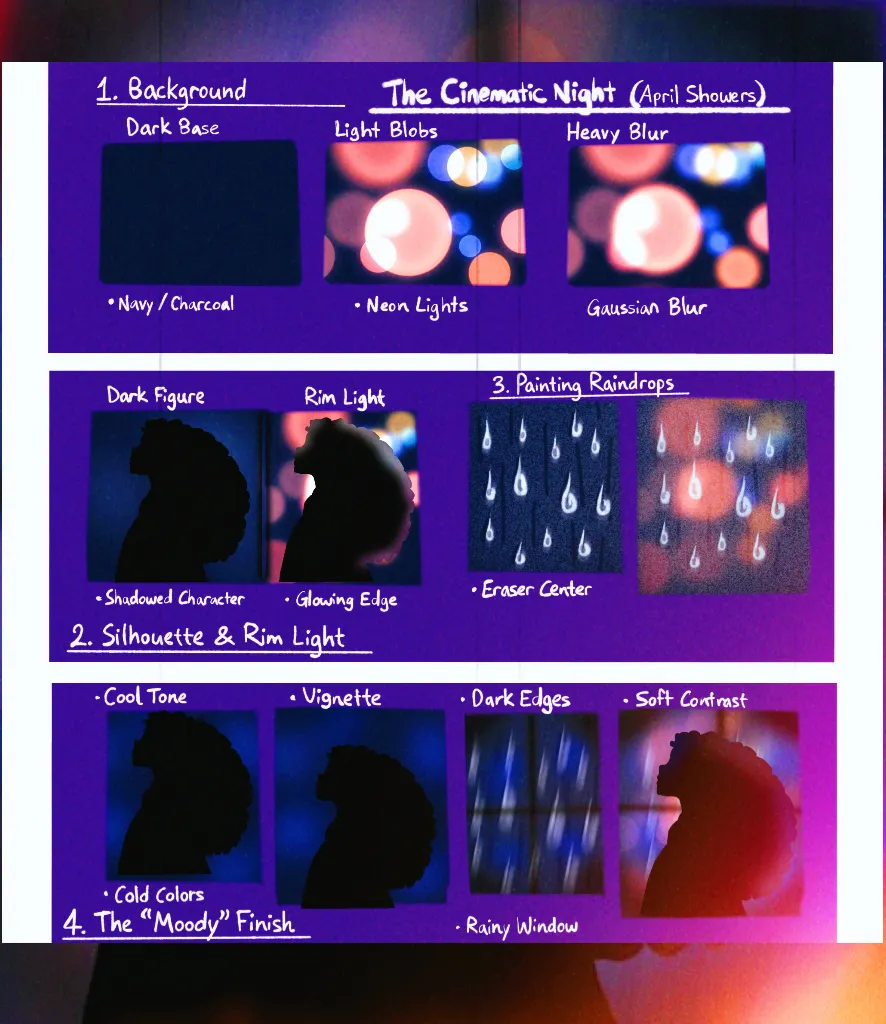
🌌 Step 1: The Background “Bokeh” (Distant City Lights)
Dark Base
Start with a deep, rich background:
Navy blue
Charcoal
Deep purple
Avoid pure black—color gives more depth.
Light Blobs (City Lights)
Create a layer behind where your character will be.
Using a soft brush:
Paint scattered circles/blobs of light
Vary sizes (small → large)
Color ideas:
Neon pink 💖
Cyan blue 💙
Warm orange 🧡
Soft yellow 💛
💡 Keep them uneven and imperfect this feels more natural.
Heavy Blur
Apply Gaussian Blur (high amount)
You want:
Soft glowing orbs
No sharp edges
A dreamy, out-of-focus look
✨ This mimics rainy windows + camera blur (bokeh)
Optional Glow Boost
Duplicate the light layer → set to Screen/Add
Lower opacity until it feels like:
Soft glowing lights
Not overpowering
🌑 Step 2: The Silhouette & Rim Light (The Emotion Anchor)
The Character
Create your subject in front of the lights.
Keep them mostly in shadow
Use deep blues, purples, or muted tones
Pose them facing the “window” (toward the lights/viewer)
Ideas:
Sitting by a window
Leaning on glass
Looking out quietly
💡 The less detail, the more emotional it feels.
The Rim Light (Glow Edge)
Pick a bright color from your background (like neon pink or cyan).
On a new layer:
Use a small soft brush
Paint a thin glowing line along:
Hair edges
Shoulders
Side of face
✨ This creates separation from the background
✨ And gives that cinematic lighting effect
Soften the Glow
Slightly blur the rim light
Or lower opacity
It should feel like light touching them, not outlining them.
🌧️ Step 3: Painting the Raindrops (The Glass Layer)
This is what sells the entire scene.
Create the Glass Layer
Add a new layer at the very top.
Everything here sits on the “window,” not the character.
The Drops
Using a small hard brush:
Draw tiny vertical shapes:
Short lines
“Pill” shapes
Small dots
If you want the rain more realistic use motion blur ;)
Color:
Soft white
Pale blue
Scatter them randomly across the canvas.
The Drips
Add longer, slightly wobbly vertical lines.
Vary thickness and length
Let some overlap the character
✨ This creates movement and realism.
Light Refraction Trick (Important Detail)
Take a small eraser:
Lightly erase a thin line through the center of some drops
This creates:
A highlight + shadow effect
The illusion of light bending through water
💡 Small detail = huge realism boost.
Optional Glow on Drop
Lightly airbrush:
A soft glow on some drops
Especially where light would hit
🌙 Step 4: The “Moody” Finish (Atmosphere & Emotion)
Color Mood Adjustment
If your app allows:
Add a cool/blue/purple filter
Or use Color Balance:
Slightly cooler shadows
Slightly warm highlights
Vignette (Focus Control)
Create a new layer → set to Multiply
Using a large soft brush:
Paint dark purple/blue around edges
Leave the center (window area) brighter
✨ This pulls the viewer’s eye inward.
Soft Contrast Pass
Use a soft airbrush:
Deepen shadows in corners
Slightly brighten light areas
Keep it subtle this is a quiet piece.
Optional: Add Grain
For a cinematic finish:
Add light noise/grain (Overlay, low opacity)
✨ Makes it feel like a film still.
💫 Final Result
You’ll have:
Glowing blurred city lights
Rain-streaked glass
A soft, emotional silhouette
A calm, cinematic night atmosphere
🌧️ Emotional Tip (This matters)
While working, think:
What is your character feeling?
Are they waiting? remembering? resting?
Let that guide your choices.
💙 Artist Reminder
Not all art needs to be loud to be powerful. Quiet pieces can hold the deepest emotions.
