


🧰Materials Needed
Digital drawing tablet or iPad
Drawing software (Procreate, IbisPaint, Clip Studio Paint, Krita, etc.)
Your favorite brushes (especially a dry brush for blending)
Patience, curiosity, and a love for learning ✨
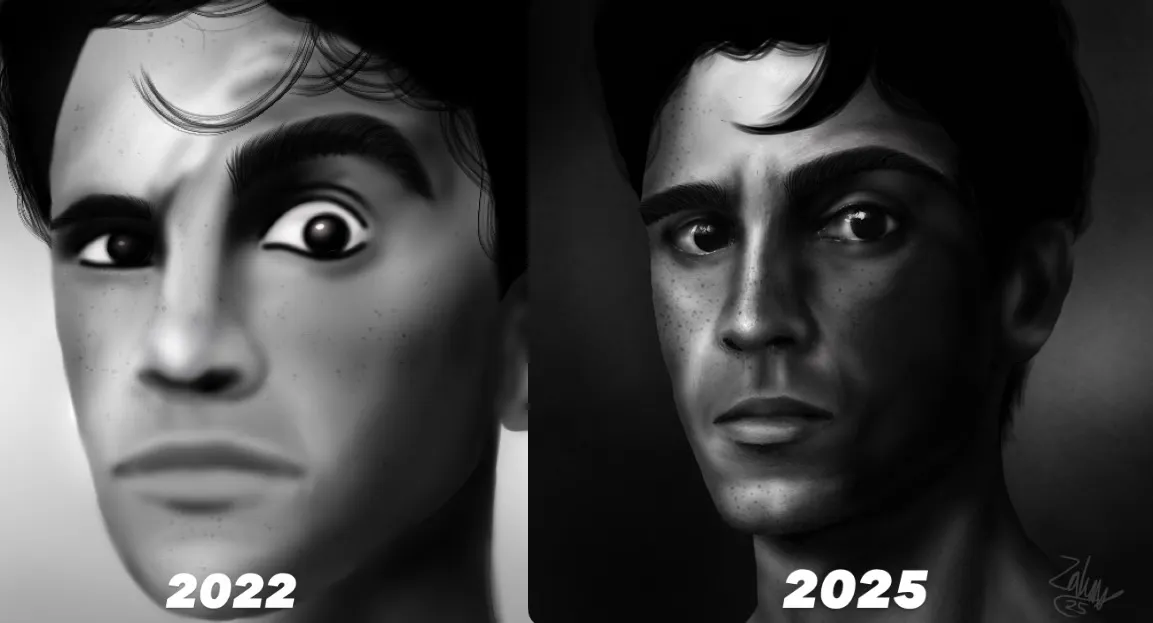
1️⃣ Working Too Big, Too Soon
When I started, I used to work on giant canvases because I thought it made my art look more professional. Instead, it just made the process stressful and slowed my progress.
❌ The Problem:
Too many details to manage.
Lag or performance issues.
Harder to focus on the overall piece.
✅ The Fix:
Work smaller! I now color on canvases around 1500–2000 pixels wide.
It’s easier to focus on lighting, shape, and blending and you finish faster while learning more efficiently.
2️⃣ Overblending Everything
I used to blend so much that my art looked like one big blur no texture, no form.
❌ The Problem:
Skin and surfaces lose detail.
Everything looks flat or airbrushed.
✅ The Fix:
Placing Colors down in smaller pieces
Blend with a dry brush 3%
This keeps texture and adds a painterly, natural feel to your art. Less is more when blending!
3️⃣ Rushing to Finish
I used to rush through every artwork just to get it done. The results always looked messy and unfinished.
❌ The Problem:
Missed mistakes.
Unrefined lighting or color.
Burnout from pushing too fast.
✅ The Fix:
Slow down and take your time. Step away for a few minutes or hours, then come back with fresh eyes. You’ll spot improvements instantly.
Art isn’t a race it’s okay to take breaks and enjoy the process.
4️⃣ Ignoring Values and Lighting
I used to color without planning where the light came from, which made my art look flat no matter how much I shaded.
❌ The Problem:
No clear light source.
Shading looks random.
Art lacks depth.
✅ The Fix:
Start with simple light and shadow shapes before you blend. Think about where your light source is above, side, behind?
Try turning your art grayscale occasionally if it still looks balanced, your values are strong!
5️⃣ Comparing Myself to Other Artists
This was my biggest mistake. I’d scroll online and feel like I wasn’t improving fast enough compared to others.
❌ The Problem:
Creative burnout.
Loss of confidence.
Art block from self-doubt.
✅ The Fix:
Compare yourself only to your past self. Look back at your old artwork and see how far you’ve come that’s your real progress.
Remember, every artist grows at their own pace.
🌱Final Thoughts
Mistakes are part of every artist’s journey they’re how we learn!
Once I started working smaller, blending smarter, and taking my time, I noticed real growth in my art. So be patient with yourself, stay consistent, and celebrate every improvement no matter how small. 💕
